# Example: C4 Context Diagram
A C4 Context diagram (Level 1) shows **who uses the system** and **what external systems it depends on**. It is the highest level of abstraction — no internal components, just actors and system boundaries.
## The Prompt
```
/c4-diagram OrderPlatform context flowchart
System: Order Platform
Description: Handles orders and inventory
Actors:
- Customer: Places orders online
- Admin: Manages inventory
External systems:
- Payment Gateway: Processes payments (outgoing, REST)
- Shipping API: Arranges delivery (outgoing, REST)
Requirements:
- Use flowchart LR with C4 styling
- Persons in dark blue (#08427B)
- System in medium blue (#1168BD)
- External systems in grey (#999999)
- Maximum 0 edge crossings
```
## The Result
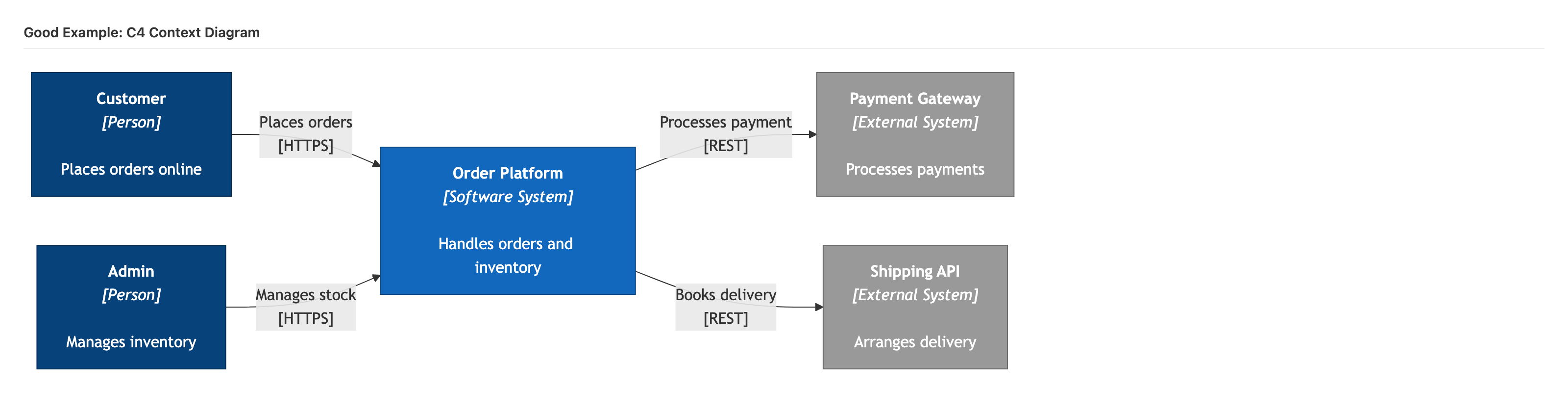
```mermaid
flowchart LR
User["Customer
[Person]
Places orders online"]
Admin["Admin
[Person]
Manages inventory"]
System["Order Platform
[Software System]
Handles orders and inventory"]
Payment["Payment Gateway
[External System]
Processes payments"]
Shipping["Shipping API
[External System]
Arranges delivery"]
User -->|"Places orders
[HTTPS]"| System
Admin -->|"Manages stock
[HTTPS]"| System
System -->|"Processes payment
[REST]"| Payment
System -->|"Books delivery
[REST]"| Shipping
classDef person fill:#08427B,stroke:#052E56,color:#fff
classDef system fill:#1168BD,stroke:#0B4884,color:#fff
classDef external fill:#999999,stroke:#6B6B6B,color:#fff
class User,Admin person
class System system
class Payment,Shipping external
```
## What Makes This Good
### Declaration Order
Elements are declared in tier order:
1. **Actors first** (Customer, Admin) — leftmost
2. **Central system** (Order Platform) — middle
3. **External systems** (Payment, Shipping) — rightmost
### C4 Styling
- **Dark blue** (`#08427B`) for persons — the most prominent elements
- **Medium blue** (`#1168BD`) for the system under discussion
- **Grey** (`#999999`) for external systems — visually recedes
### Label Format
Each element uses the C4 convention:
```
Name
[Type]
Description
```
This tells the reader *what it is* and *what role it plays* at a glance.
### Relationship Labels
Each connection includes:
- **What happens** ("Places orders", "Processes payment")
- **How** (protocol in brackets: `[HTTPS]`, `[REST]`)
### Zero Crossings
With 5 elements and a clean left-to-right flow, there are zero edge crossings. Every relationship can be traced without ambiguity.
## Common Mistakes to Avoid
- **Too many actors** — Keep to 2-3 key personas. More belongs on a stakeholder map.
- **Internal components** — Do not show databases or services. That is Level 2 (Container).
- **Missing descriptions** — Every element should explain its purpose in under 40 characters.
- **No protocol labels** — Relationships without technology context are less useful.
---
**Related skill:** [`/c4-diagram`](../../skills/diagramming/c4-diagram.md) generates this format automatically from system parameters.